

Bynder DAM & GraFx Studio: High-End Print and Digital Output at Scale
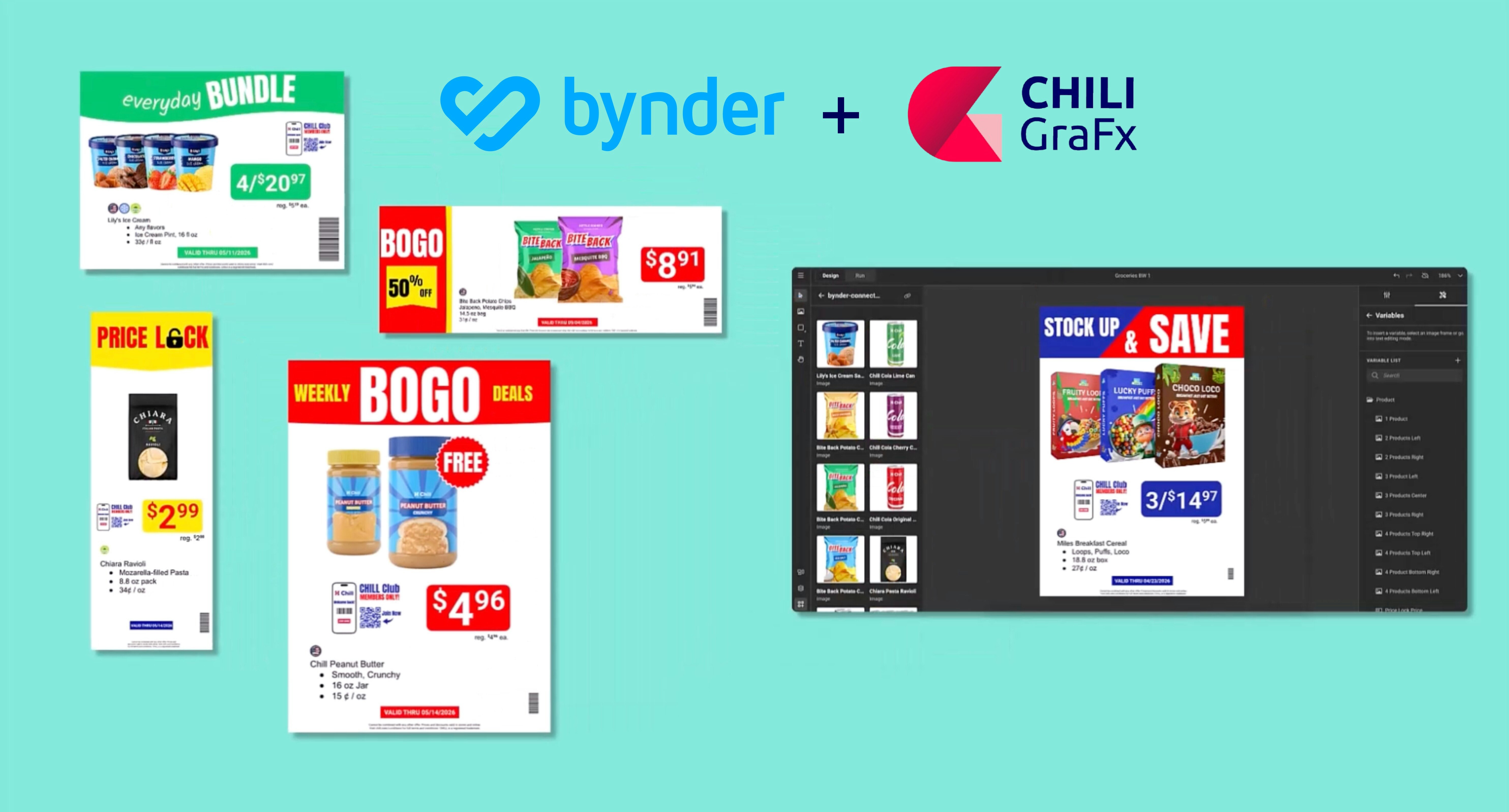
Bynder governs your brand assets brilliantly. But in Retail, the real bottleneck was never finding the right file. It was producing the right output, in the right format, for the right store, at the right time. That's a different problem. And it needs a different engine.
Upcoming webinar: Turn your Bynder DAM into a Creative Automation Engine with CHILI GraFx. Thursday 16 April, 4pm CET (10am ET) – REGISTER HERE.
Let's be honest about where Bynder performs brilliantly.
Your DAM is the single source of truth for approved campaign photography. It governs brand assets, manages rights, routes files through approval workflows, and makes sure local market teams are pulling from the right version of every asset.

For all of that, Bynder is excellent — and the reason large retailers invest in it.
Now let's be equally honest about where the problem actually lives for heads of creative operations in promotion-based retail, like grocery retail and consumer goods like furnishing, electronics and cosmetics.
The problem is not finding the approved product shot. The problem is generating 8 million locally priced point-of-sale displays this month, each correctly formatted for print, with the right store-specific pricing, the right compliance text for the right market, in five languages, across three output formats, without your design team burning out or your local markets waiting a week for a price update.
That is a production problem. Bynder was not built to solve it. Bynder Studio, the creative templating module, gets you meaningfully closer for digital and social formats. But for Retail at scale, it still leaves a critical gap. Here is what that gap looks like in practice, and why closing it requires a different kind of engine.
What Bynder Studio is actually good for
Bynder Studio's Brand Templates are genuinely useful for self-service content adaptation. A local marketer can take a centrally designed social banner, swap the copy for their market, change the product image from the DAM, and publish, all without touching the design team. For social media, email headers, and simple digital formats, this works well.
Bynder’s Advanced package adds batch creation via CSV upload and an approval workflow. For teams producing hundreds of social assets per campaign, this can be a real efficiency gain.
The ceiling appears when your requirements include print-grade output, complex conditional logic, multilingual text reflow, or automated data-driven generation triggered by upstream systems. Bynder Studio was designed for a marketing generalist who needs to adapt a template. It was not designed for a production pipeline that needs to run at 3am when your pricing database updates.
The four gaps that cost retailers most
Gap 1: Bynder doesn’t offer production-grade print output
Your promotional materials do not live only on screens. Shelf talkers, floor stickers, A3 in-store posters, and weekly flyers are print artifacts, which means they require correct color profiles, bleed, and resolution to go from design to press without an expensive reproof cycle.
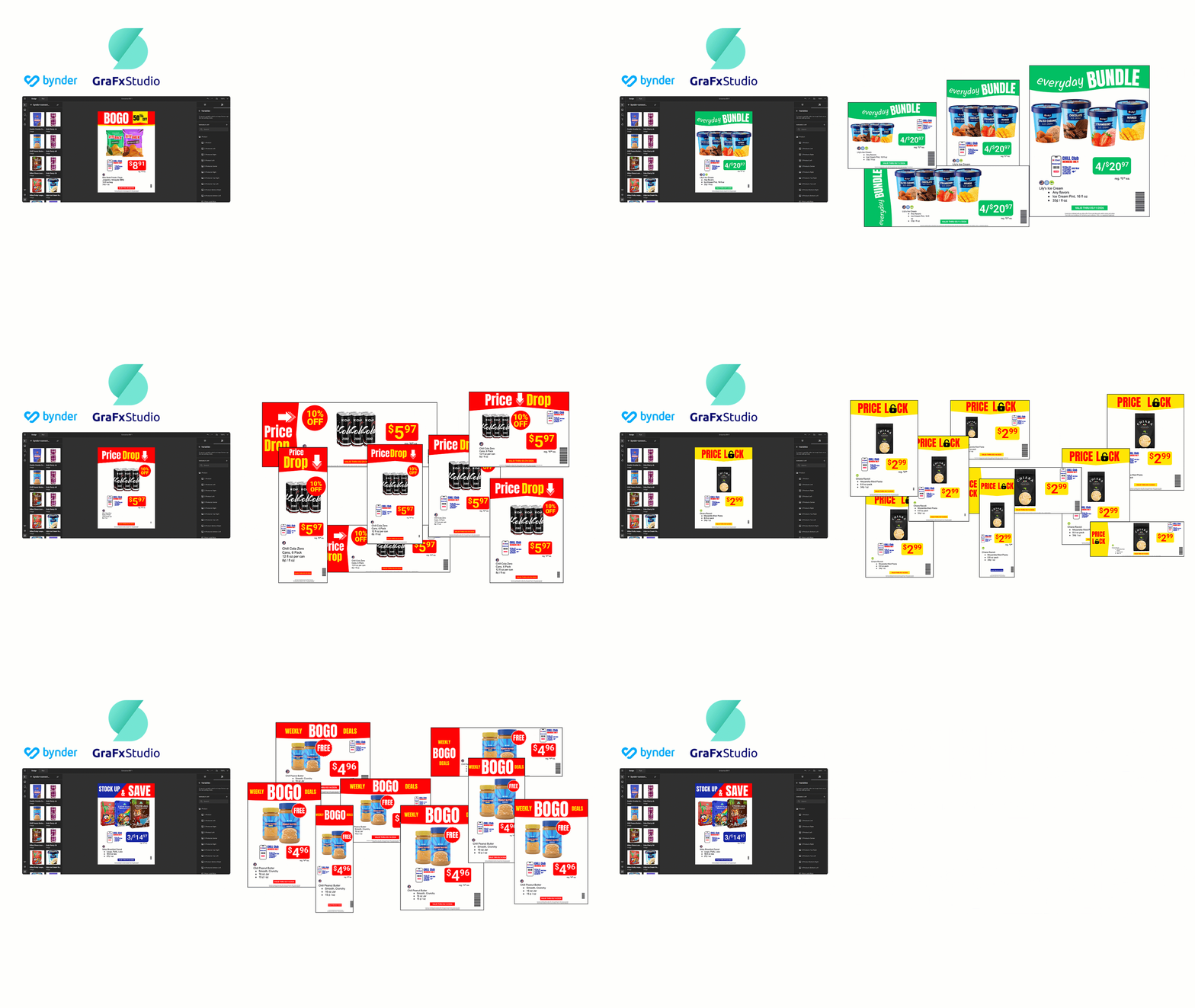
Bynder outputs digital assets for web and social. GraFx Studio outputs print-ready PDFs alongside animated MP4s for digital signage, static JPGs for web, and HTML for dynamic displays — all from the same design system, in the same automated run. If you require any print formats, you need a print-capable engine in your stack. That is not what Bynder Studio was built to be.
Gap 2: Bynder offers limited creative automation
Bynder Brand Templates are parametric. You define which fields are editable and which are locked. That is sufficient for simple adaptation: change the headline, swap the image, publish.
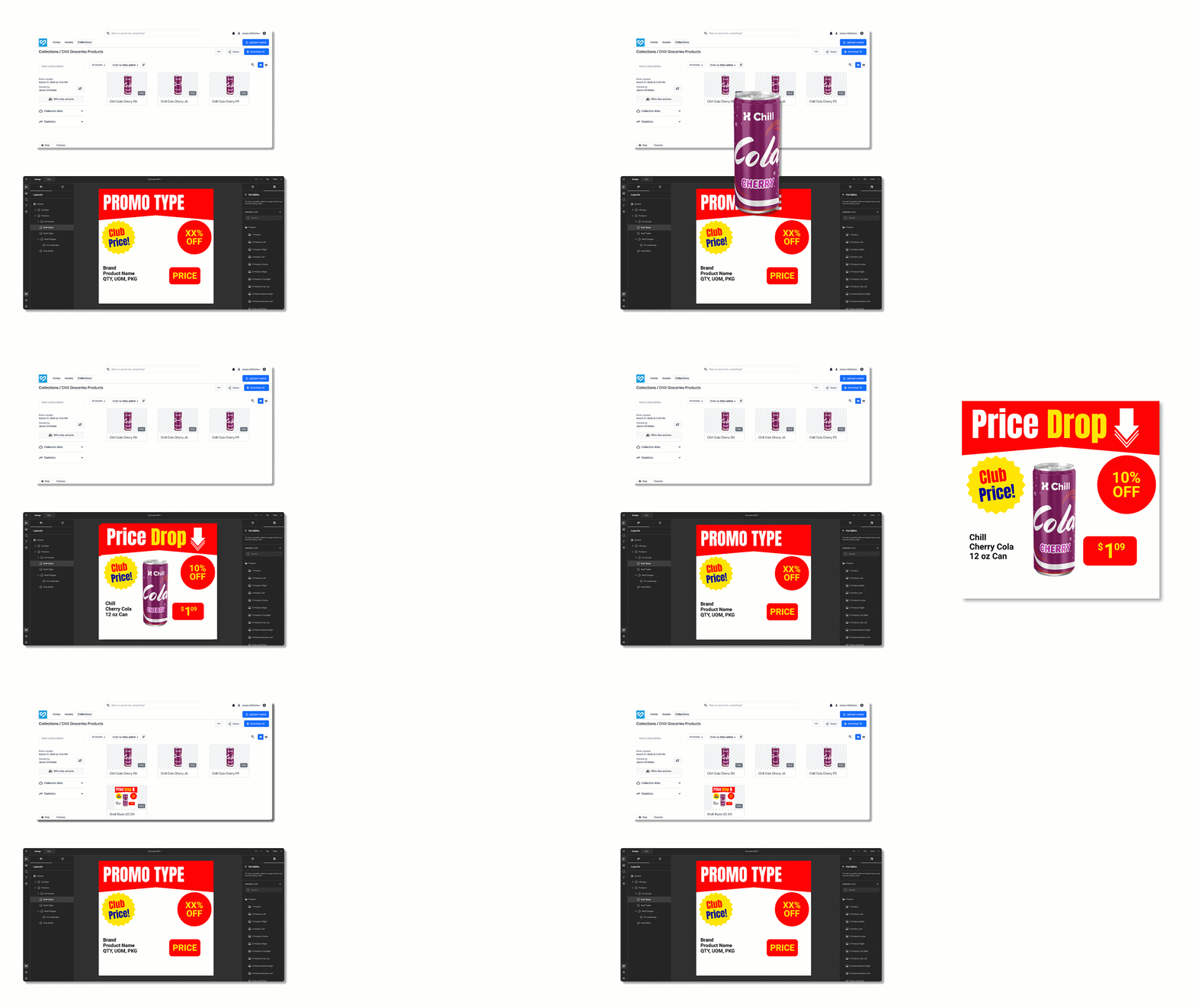
Retail promotional materials are rarely simple. A promotional POS display in England needs a reference price, a loyalty card price, a promotional price, the correct unit pricing format, and in some categories, a regulatory compliance element — and the layout needs to recompose depending on which combination of those elements apply to this specific SKU in this specific market.
GraFx Studio design systems are programmatic. You can encode the logic that says ‘if this SKU is on promotion, show this component and trigger this layout; if it is a loyalty offer only, use this component instead.’ That is not locking or unlocking fields — it is encoding your business rules into the design system itself.
This is the difference that makes compliance-by-design possible. When the rules are in the design system and the dynamic layouts, local teams cannot accidentally violate them. They do not need to remember what is and is not allowed. The system responds to the incoming data, and simply does not produce non-compliant output.

Gap 3: Bynder offers limited data-driven graphics production
Bynder Studio’s batch creation feature requires a human to upload a CSV and initiate the run. For monthly or quarterly campaign production, that can be acceptable. For weekly promotional cycles with pricing that updates dynamically, it is a workflow bottleneck waiting to happen.
GraFx Studio’s Output API enables headless, event-driven generation. Your pricing system updates at 11pm. A webhook triggers CHILI GraFx. By 6am, the correct shelf talkers for every store format, in every language, at the correct regional price, are in your Bynder DAM — ready for distribution. No human in the loop. No overnight design sprint. No Monday morning version confusion.
Gap 4: Self-service for one vs. self-service at scale
In Bynder Studio, individual users — typically marketers and designers — can open a template and create a new version. One user, one asset, one request at a time.
GraFx Experience, the brand portal capability in CHILI GraFx, operates at a different order of magnitude. It puts controlled design systems in the hands of end users — store managers, regional marketers, franchise operators — who brief the system on what they need: print, digital, animated, or all three. They select options and add content within brand guidelines and restrictions. They can only pick visuals from designated folders within the Bynder taxonomy. Responsive layouts use advanced capabilities including AI-powered smart crop, autogrow, copy-fitting, and restraints to adapt automatically to incoming data and visuals.
The result: creative freedom for local teams, zero unplanned work for central teams.
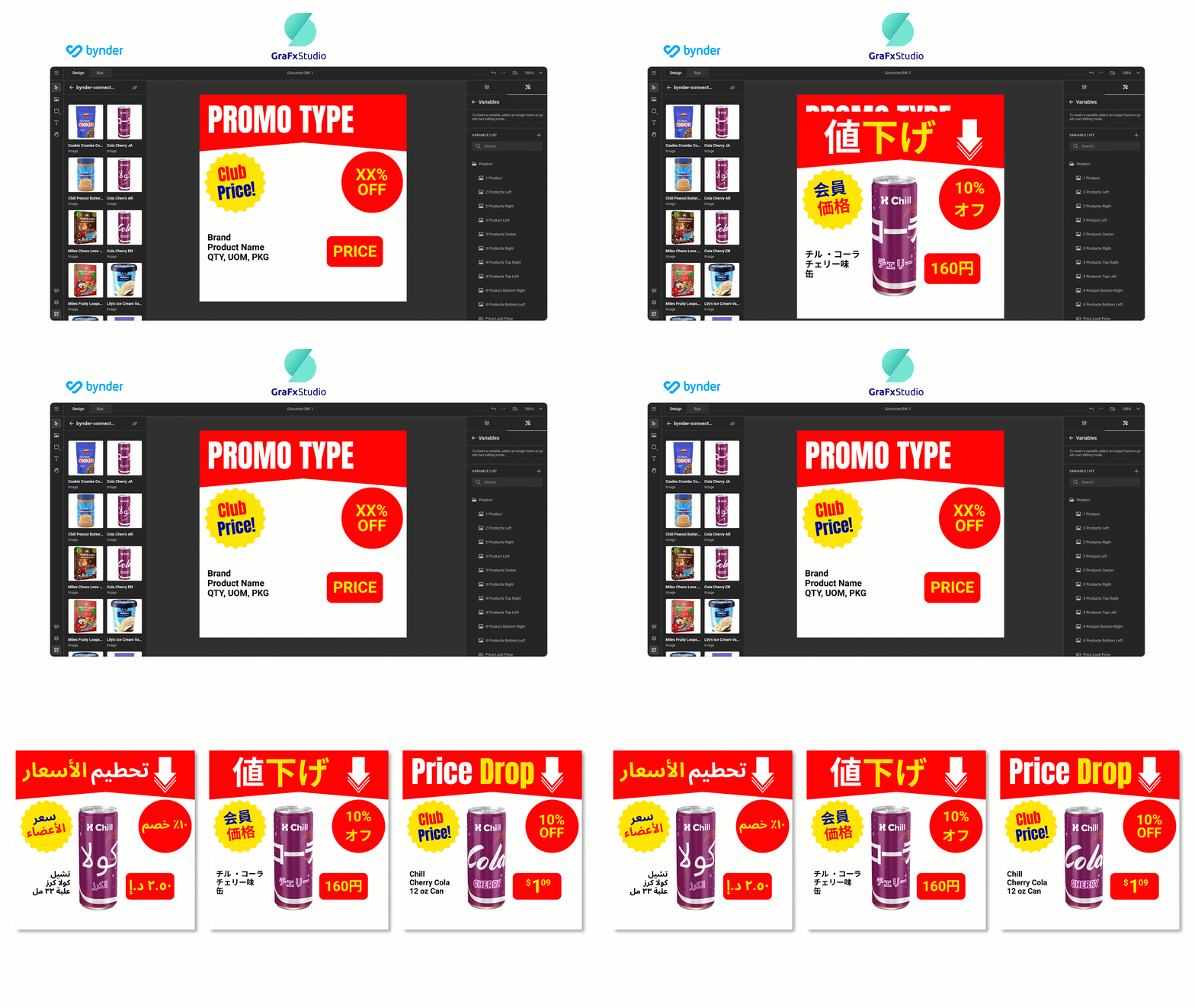
This is not a feature comparison — it is a fundamentally different model of how content production works.
What 'Bynder connected to GraFx Studio' actually means
The key word is connected — not replaced.
Your Bynder DAM continues to serve its core function: the single source of truth for approved brand assets.
GraFx Studio pulls your assets from Bynder via the Connector Framework, meaning template designers and local market users working in GraFx Studio can browse and select assets directly from Bynder without downloading and re-uploading them. The asset governance chain remains intact.
The two platforms operate as complementary layers in the same stack — asset governance on one side, production engine on the other.
'What is the approved asset?' is a question Bynder answers. 'How do I turn that approved asset into 8 million correctly formatted, locally priced POS outputs this month?' is the question only GraFx Studio can answer. One is about governance. The other is about production. You need answers to both.
The proof points from grocery retail
This is not theoretical. Retailers at scale are already operating this model.
Carrefour, working with ARiSTiD Retail Technology, uses CHILI GraFx as its creative automation engine across 1,200 stores. The results: 8 million locally priced POS displays generated every month, 35,000 national flyer pages annually, doubled e-catalog click rates, and a 17-point increase in customer satisfaction score.
Colruyt Group: 80% of creative tasks for recurring publications are now executed independently by brand marketers, 35% of recurring orders are fully automated, and 40% of in-house agency capacity has been reallocated to bespoke creative work.
Intermarché generates localized assets across 1,800+ stores — adapting centrally produced campaign materials for regional pricing, offers, and cultural context at the pace of weekly promotional cycles.
In each case, a DAM system continues to operate as the asset governance layer. CHILI GraFx is the production engine that converts those governed assets into output at retail speed.

By unifying how we work and automating recurring tasks, we were able to free up significant time and resources for the more complex marketing initiatives requiring human creativity and ingenuity.

Kathleen Bauwens
Colruyt Group
Join us: see the stack in action
If you are responsible for creative operations in retail, managing promotional cycles across multiple markets, multiple formats, and mounting pressure to produce more with fewer resources, this webinar is built for you.
Upcoming webinar: Turn your Bynder DAM into a Creative Automation Engine with CHILI GraFx. Thursday 16 April, 4pm CET (10am ET) – REGISTER HERE.
We will show exactly how the Bynder Connector for CHILI GraFx operates: how assets flow from Bynder into design systems, how production logic enforces brand and compliance rules, how batch and automated output generation works across print and digital formats, and how local market teams can adapt centrally governed campaigns without breaking a single brand rule.
What you will learn:
- How Bynder and GraFx Studio work as a connected stack: asset governance meets production engine
- Live demo: from Bynder DAM to print-ready POS output in a single automated workflow
- How design systems encode brand and compliance rules so local teams cannot break them
- How headless, API-triggered generation eliminates overnight production bottlenecks
- Real results from grocery retail deployments: Carrefour, Colruyt Group, and Intermarché
Product,
Marketing

Kees Henniphof
Mar 19, 2026
Sign up for blog updates
Related articles

Product,
Marketing

Bram Verniest
Feb 25, 2026

Partners

Umesh Kumar Gope
Jan 21, 2026